
Video collections built for production workflows — timestamped client feedback, structured revision rounds, subtitle support, and professional delivery. All in one place, with unlimited users and no per-seat fees.
Structured rounds, exact timestamps, and a clear path from first cut to approval.
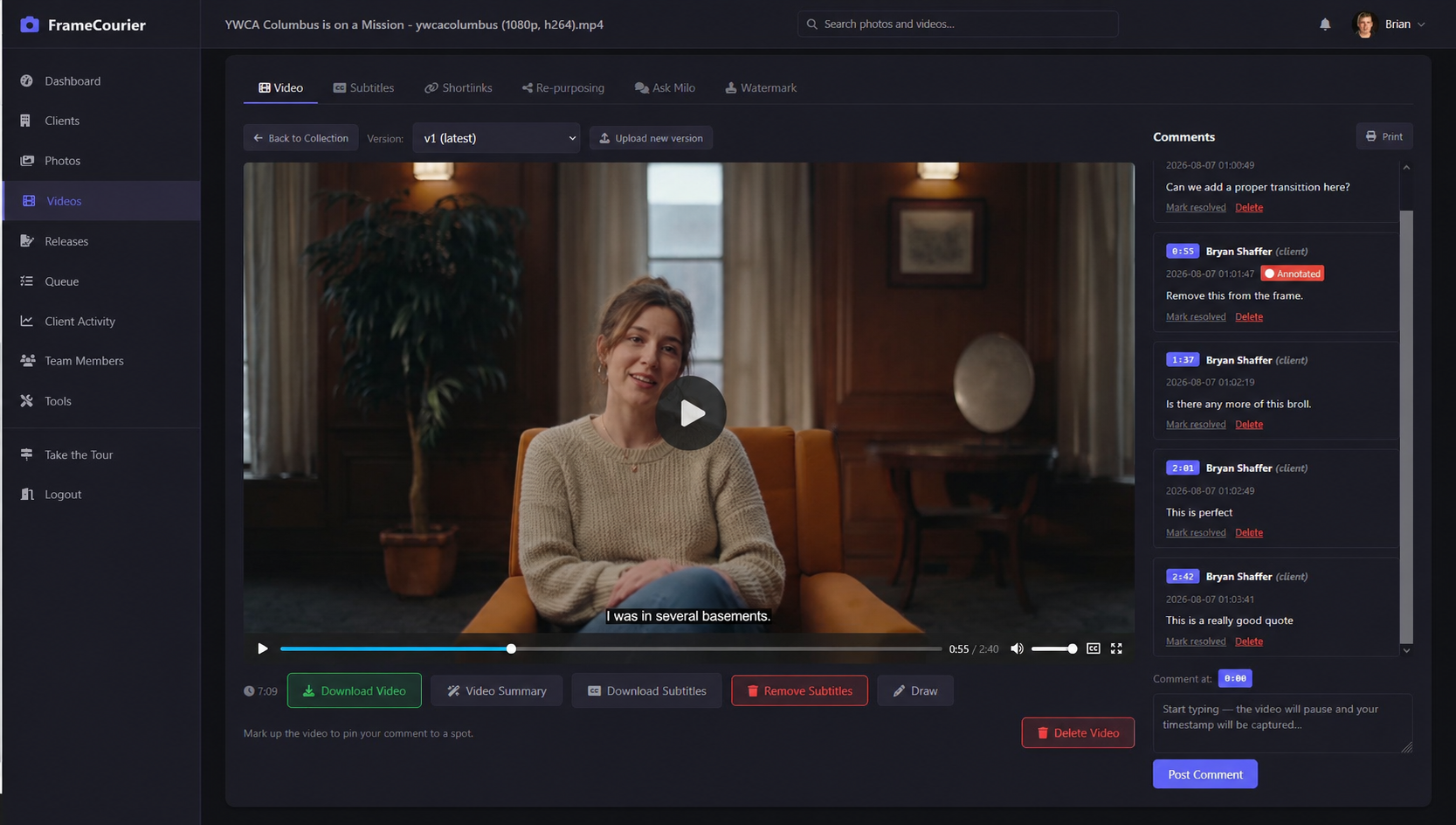
A look at the actual FrameCourier video review interface — player, timestamped comments, and revision tracking.
A collection is a set of related videos — a campaign, a project, a deliverable package. Organize them your way.
Upload multiple videos at once. The platform accepts all common video formats. Thumbnails are generated automatically in the background.
Each collection displays an animated GIF thumbnail selected randomly from its videos — clients see motion, not a static frame.
Search by name, tags, or keywords. Both your team and your clients can find any collection without browsing everything.
Clients watch videos directly in their browser — no downloads required to review. A clean player with full playback controls.
Need to add a revised cut or a bonus deliverable? Add videos to any collection at any time.
Generate model and property releases from your admin tools. Each client has a permanent QR code — models scan and sign a branded release on their phone. Canvas signature pad, optional parent/guardian fields. Notifications, PDF downloads, and CSV export included.
Generate a video licence covering broadcast, streaming, and web use, then attach it so clients see your terms on every collection.
Apply your logo watermark to videos automatically. Control placement and scale — watermarks are baked into the video during transcoding.
Clients leave feedback at the exact moment in the video. The timestamp is captured automatically — you know precisely what they're talking about.
When a client starts typing a comment while a video is playing, the video pauses and the exact timestamp is recorded. No manual entry required.
Clients draw arrows, shapes, and highlights directly on the video frame — so you see exactly what they mean, not just read about it.
All comments appear below the video in order. Click any comment to jump directly to that moment in the video.
Once you've addressed a comment, mark it resolved. Clients see resolved and unresolved feedback clearly — everyone knows what's done and what's not.
Keep all client feedback organized across multiple revision rounds — from v1 to final approval.
Upload a new version of a video alongside feedback from the previous round. All comments stay organized and associated with the right version.
Play any two versions next to each other with locked, synced playback and an adjustable offset — spot exactly what changed between the rough cut and the revision.
See instantly which feedback has been addressed and which is still outstanding — no spreadsheets, no email threads.
Multiple people on the client side can review and comment — art directors, producers, stakeholders — each with their own account scoped to their client.
Upload or auto-generate SRT subtitles, correct them right in the browser, and let clients toggle captions on and off while they review.
Name your subtitle file to match the video filename (e.g. interview.srt for interview.mp4) and it's paired automatically — no manual linking.
Generate subtitles automatically from video audio using Whisper AI — no manual transcription or third-party tools. Upload any video and subtitles are created for you.
Fix AI-generated or uploaded captions right in the browser. Play the video with live captions, click any line to correct it — playback pauses while you type — step through cues with prev/next, and save. Your SRT file and transcript update instantly. No external subtitle tools.
Clients can toggle subtitles on and off during playback directly in the player — no page reload, no extra steps.
If downloads are enabled, clients can download the SRT file for offline use or localization — alongside the video file itself.
Automatic video summaries, social clip suggestions, and a chat assistant powered by AI — so you spend less time on admin and more time shooting.
Auto-generated summaries from video transcripts — get a quick overview of any video without watching the whole thing. Perfect for reviewing long edits or client calls.
AI identifies the best moments for social media clips from your video transcripts — ready to export and share. Turn long-form content into shareable moments automatically.
Chat with Milo about any video — grounded in its transcript, client summary, and review comments — and get instant answers without re-watching or digging through feedback.
Create expiring, password-protected video links in seconds. Every link gets a downloadable QR code.
Set an expiry of 30, 60, 90, or 120 days — or 1 year, or never. Links go dead automatically on schedule.
Add a password to any shortlink. Viewers enter it once before accessing the video collection.
Every shortlink generates a QR code you can download and share — in emails, presentations, or printed materials.
Copy any shortlink to your clipboard instantly — no selecting, no highlighting.
Create multiple shortlinks per collection — different expiry settings, different download permissions, different passwords.
Enable or disable video downloads per collection and per shortlink. Clients download exactly what you allow — nothing more.
Clients review and approve in a portal that looks like your company — with all their work in one place.
The client portal is completely customizable to match your branding — your logo, your brand color, your name, on your own you.framecourier.com address. Clients see your studio, never ours.
No more endless links buried in email. Clients log in once and access every video collection — and every photo gallery — you've delivered, all in one place.
Upload your video licence terms once. Clients view them in a click on any video collection — your terms travel with the work, on the logged-in portal and on shared links alike.
Clients can embed videos directly on their own site with a copy-paste <iframe> snippet — no coding required. Perfect for portfolio sites, client reviews, or project showcases.
Frame.io is great. But every video production company also delivers photos — and Frame.io is built around video review.
Your team shoots stills alongside video — BTS, headshots, product shots, deliverables. Frame.io is built around video review. FrameCourier gives you full photo galleries with RAW support, watermarking, copyright EXIF, and ZIP downloads — all in the same platform as your video review.
Frame.io charges $25 per person per month. A 5-person team pays $125/mo before any storage add-ons. FrameCourier Pro is $49/mo for your entire team — unlimited users, unlimited clients, 500GB of storage. Add a 10th editor, an intern, or a freelancer — no extra charge. See the cost by team size →
QR codes on every video collection. Shortlinks with expiry and passwords that work for video the same way they work for photos. A licence builder and contract generator for video usage terms and production agreements. A fully branded client portal where clients find both photos and videos. And unlimited guests — no per-person invite fees.
Frame.io is great for video review. Pixieset, Pic-Time, and ShootProof are built for photos. FrameCourier is built for both from day one — without seat fees.
| Feature | Frame.io | Pixieset | Pic-Time | ShootProof | FrameCourier |
|---|---|---|---|---|---|
| Photos | |||||
| Photo Galleries & Delivery | No— | Yes | Yes | Yes | Yes |
| Watermarking | No— | Yes | Yes | Yes | Yes |
| RAW File Support | No— | Yes | Yes | No— | Yes |
| Photo Proofing (Favorites) | No— | Yes | Yes | Yes | Yes |
| ZIP Downloads | No— | Yes | Yes | No— | Yes |
| Embedded Copyright Metadata | No— | No— | No— | No— | Yes |
| Licence Builder & Terms | No— | No— | No— | No— | Yes |
| Video | |||||
| Video Review & Approval | Yes | No— | No— | No— | Yes |
| Video Watermarking | Yes | No— | No— | No— | Yes |
| Timestamped Comments | Yes | No— | No— | No— | Yes |
| Visual Annotations | Yes | No— | No— | No— | Yes |
| Revision Rounds | Yes | No— | No— | No— | Yes |
| Side-by-Side Version Compare | Yes | No— | No— | No— | Yes |
| Subtitle / SRT Support | Yes | No— | No— | No— | Yes |
| Auto-Generate Subtitles (AI) | No— | No— | No— | No— | Yes |
| In-Browser Subtitle Editor | No— | No— | No— | No— | Yes |
| AI Video Summaries | No— | No— | No— | No— | Yes |
| AI Social Clip Suggestions | No— | No— | No— | No— | Yes |
| AI Video Chat (Ask Milo) | No— | No— | No— | No— | Yes |
| Platform | |||||
| Branded Client Portal | No— | Yes | Yes | Yes | Yes |
| Unlimited Team (No Seat Fees) | No— | No— | No— | No— | Yes |
| QR Codes on Every Gallery | No— | No— | No— | No— | Yes |
| Model & Property Releases (QR + e-sign) | No— | No— | No— | No— | Yes |
| Contracts (drafted, saved & e-signed) | No— | No— | No— | No— | Yes |
| Website Embeds | No— | No— | No— | No— | Yes |
Can we tighten this cut? Feels a beat too long.
Colour grade looks perfect here.
Resolved